

 English
 Русский
 中文
You can now filter reports by marks in BeMob using the new exclusion mode. Hide elements with selected marks and keep the remaining data visible, making it easier to focus on the campaigns, placements and custom parameter values you want to analyze.
The marks filter now offers two options.
Marks (Inc) displays only elements with the selected marks. Marks (Exc) excludes those elements from the report and displays everything else that matches your other report settings. Elements without a mark remain visible unless you select No marks for exclusion.
To use the new option, open the report filter menu and select Marks (Exc). Choose one or more marks you want to exclude, then click Apply. The report will hide elements carrying any of those marks. You can use this option for marked elements and marked rows in custom parameter reports.
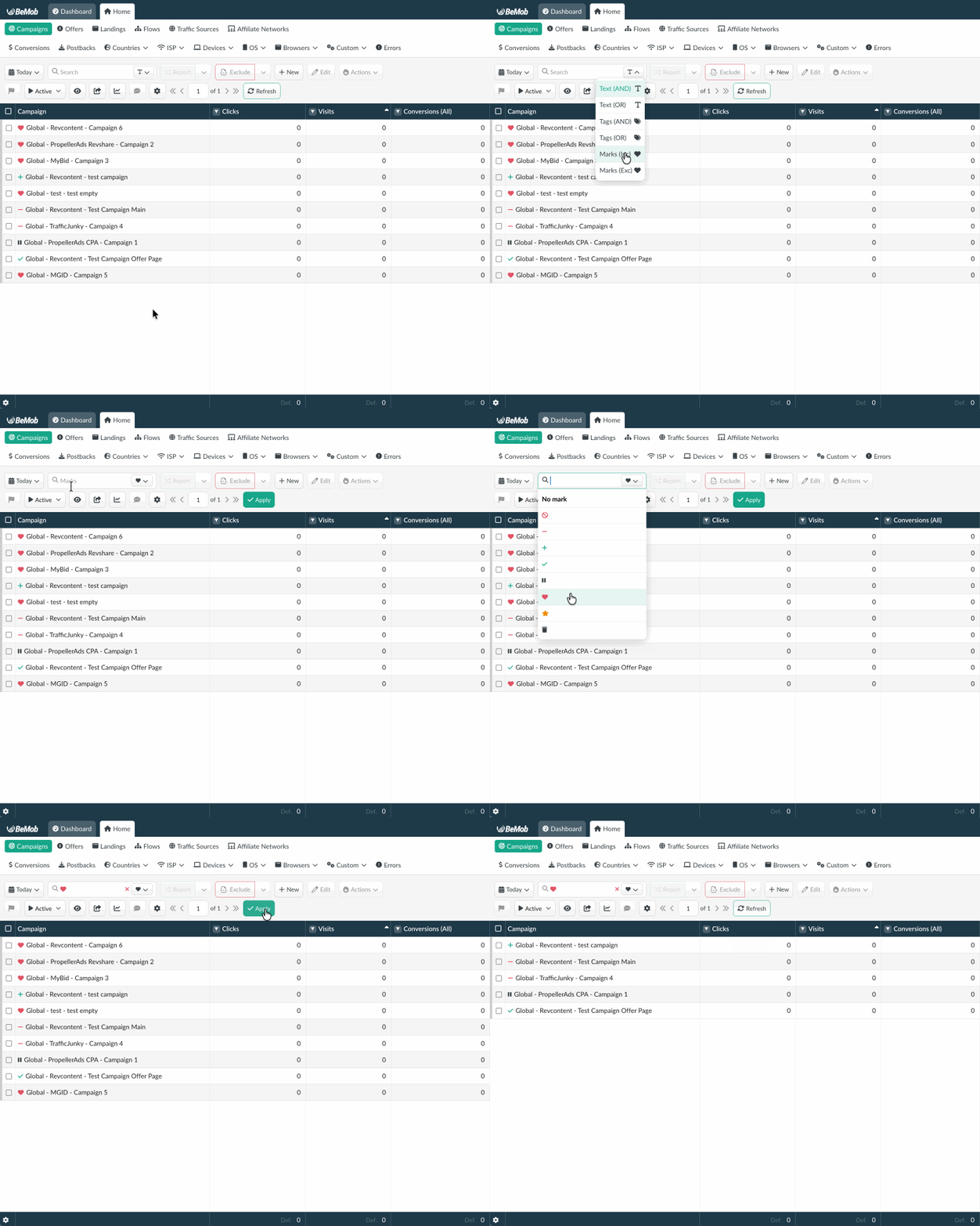
For example, you might use a particular mark to identify placements or elements you have already reviewed or decided to leave out of your current analysis. Instead of selecting every other mark to keep the remaining placements visible, simply exclude the mark assigned to those placements. Unmarked placements will stay in the report, so you can continue reviewing data you have not yet categorized.
This is especially useful when your reports contain several groups of marked elements, but only a few groups need to be excluded. It reduces manual filter selection and helps you move between different analysis views more quickly. Excluding an element changes the report view; it does not delete the element or its tracking data.
The selected filter applies consistently to report rows, totals, charts, and exports. This means you can compare results and export data using the same filtered selection, without manually removing unwanted rows afterward.
Your selected marks and filtering mode are also retained when you save or share a report. You and your team can return to the same view without rebuilding the filter. Existing saved and shared reports continue to use inclusion mode, preserving their current filtering behavior.
📧 Need a feature? Reach us out via Chat or support@bemob.com